How the painting app is built
This is a technical companion piece, explaining the implementation of the article []“Can a language model paint?”](/blog/can-a-language-model-paint/).
The python app’s split up into four main components: The orchestrator; the planner; the painter; and the evaluator. The code can be found here: https://github.com/liamlaverty/paint-by-language-model/tree/development/src/paint_by_language_model
The Orchestrator
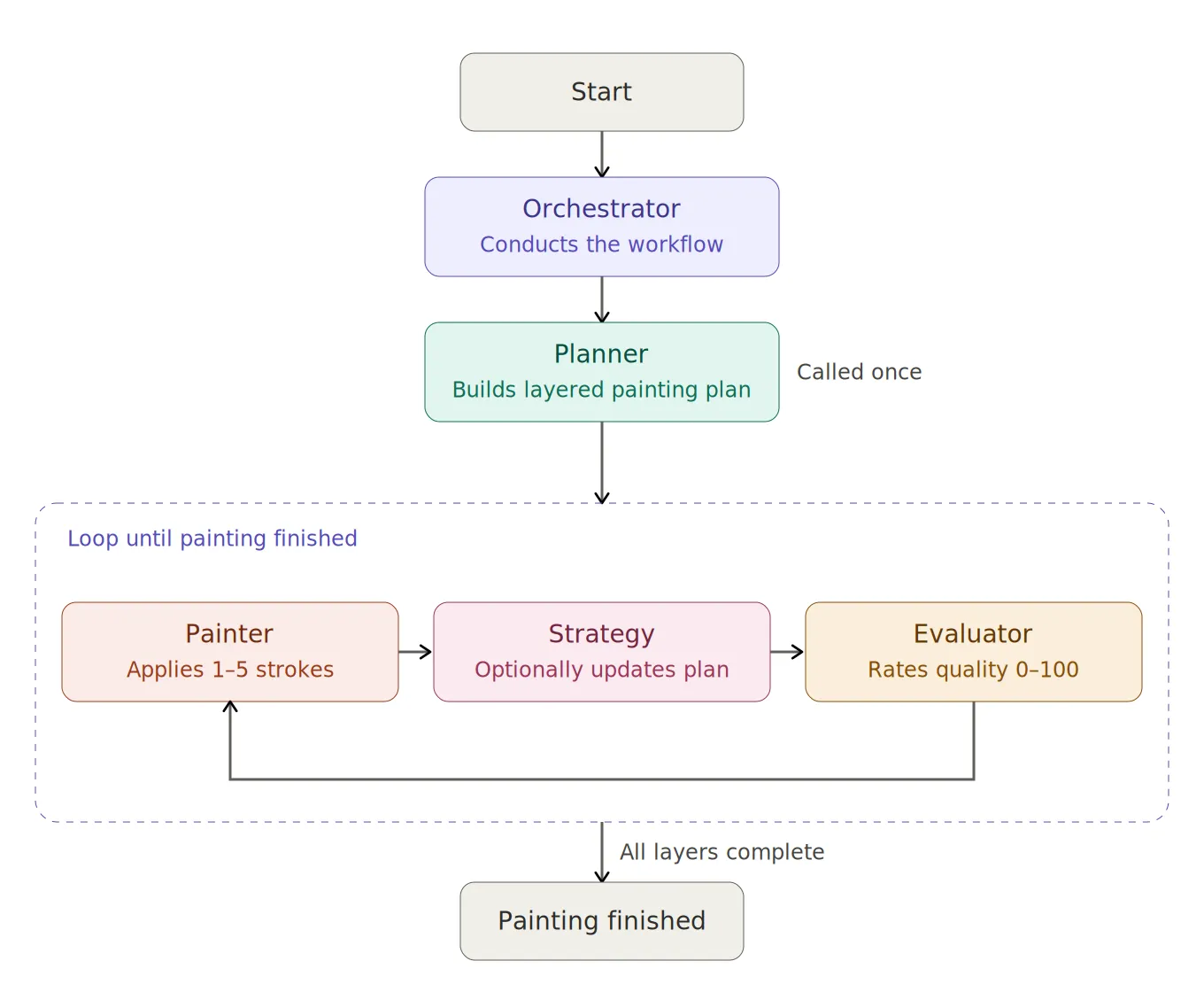
The Orchestrator is the conductor of the app & it manages the invocation of the other components. For example, if you asked the application to produce Vincent van Gogh’s Mulberry Tree, it’d invoke the Planner to produce a planning document, which is a semi-structured document describing how many layers the painting should have, and what each layer should look like. Then for the next ~100-150 iterations, the orchestrator invokes both the Painter, to apply 1-5 new strokes; and the Evaluator, to give a rating 0-100 of the technical quality of the painting . The painter is programmed to return a “completed” sate when it thinks it’s finished a layer. Once all layers in the painting plan are marked as “complete”, the painting is considered finished.
The Planner
The Planner makes a request out to an LLM which produces a semi-structured document. That document gets passed into every subsequent request to the Painter. The document includes information on the artist/genre; suggested subject; detailed subject; and a number of layers. For each layer, it also passes back the layer number, name, description, techniques, shapes, and highlights metadata for the layer. These give the Painter hints about how to proceed, but it’s not tightly constrained by the plan. The plan also suggests different stroke types to use.
{
  "artist_name": "string",
  "subject": "short subject line",
  "expanded_subject": "1-2 sentence elaboration of the subject",
  "total_layers": 1,
  "layers": [
    {
      "layer_number": 1,
      "name": "short layer name",
      "description": "what this layer establishes",
      "colour_palette": ["#DEEAAD", "#BEEEFF"],
      "stroke_types": ["splatter", "line"],
      "techniques": "brief technique notes",
      "shapes": "brief shape notes",
      "highlights": "brief highlight notes"
    }
  ],
  "overall_notes": "summary of style and unifying motifs"
}
The painter
The Painter has a few different roles, mostly it’s responsible for deciding what to paint next, applying that stroke, and updating the transient strategy document that’s passed into the next iteration of the loop. It passes a prompt to the VLM with the following:
- A request to suggest 1-5 strokes to the canvas
- A text description of the current layer & its plan
- Up to 10 base64 encoded images of sample strokes, along with the description
- Optional opportunity to declare if the layer is “complete”
- Optional opportunity to update the strategy, which will be passed into the next iteration in this layer
- A text description of the current strategy
- A base64 encoding of the current PIL canvas
Stroke types
I built out a few different stroke types for the VLMs to choose from. The available stroke types are: arc, burn, chalk, circle, dodge, dry-brush, line, polyline, splatter, wet-brush. Examples are shown in the image below:
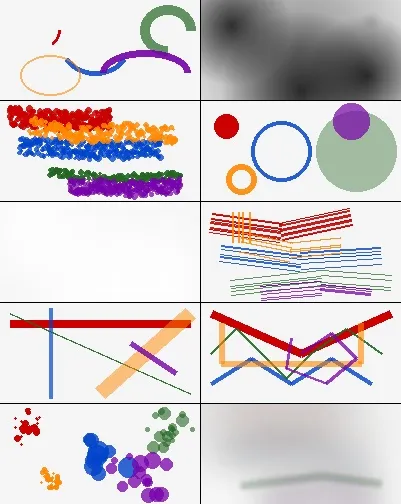
The Planner decides which are valid strokes for a given layer, and the Painter is then free to apply them within that constraint as it sees fit.
I encountered some weird caching issues implementing this block of data in a multi-vendor compatible way. To benefit from caching, I needed to have the stroke samples (large & consistent base64 strings) as high up in the prompt as possible, along with all of the rest of the data which are consistent across requests. The VLM Client, which communicates with the language model, has a bunch of if vendor is abc, do xyz type code. For example, if the vendor is anthropic, we need to dump all of the stroke sample data into the system part of the prompt so that it’s eligible for Anthropic’s ephemeral cache. Anthropic’s documentation on ephemeral cache is difficult to wade through, especially when you’re looking to send cacheable images. Meanwhile, if it’s an OpenAI compatible endpoint, it was fine to drop it into the messages segment.
Canvas management
Once the response is received from the VLM, the Painter class passes the suggested strokes to the Canvas Manager Service. The Canvas Manager keeps a PIL representation of the canvas. It accepts the suggested stroke list from the Painter, and passes them into the StrokeRendererFactory, which uses the strategy pattern to apply the appropriate rendering treatment treatment to the canvas.
Most of the time, the treatment is just “add new pixels atop the existing canvas”. However, some of the stroke types (Burn, Dodge, and Wet Brush) interact with surrounding pixels, and need to know their state. The Wet Brush renderer, for example, takes the existing canvas, renders it entirely, and then applies a gaussian-blur treatment to get a watercolour-like effect. Unfortunately, the resulting stroke looks nothing like real-world watercolour. I’d considered remedying that limitation, but since the VLMs get a sample image, they’re aware of that limitation.
The Painter VLM can optionally pass back a strategy. That strategy will be passed into the next layer, until it’s overwritten - so it’s a persistent document with transient instructions. Since the VMLs can only ever apply changes atop the existing canvas (no editing earlier layers), I wanted a way for the currently working VLM to be able to describe what it is working towards to any subsequent layer. It’s an optional property for the VLM to return. If nothing comes back, the app just continues with the previous strategy. Over time the StrategyManager builds up a document detailing everything the VLMs were attempting to achieve. Before this feature was implemented, the paintings were mostly chaotic & randomly applied strokes, best seen in Impressionist Patchwork Elephant by Mistral-Large
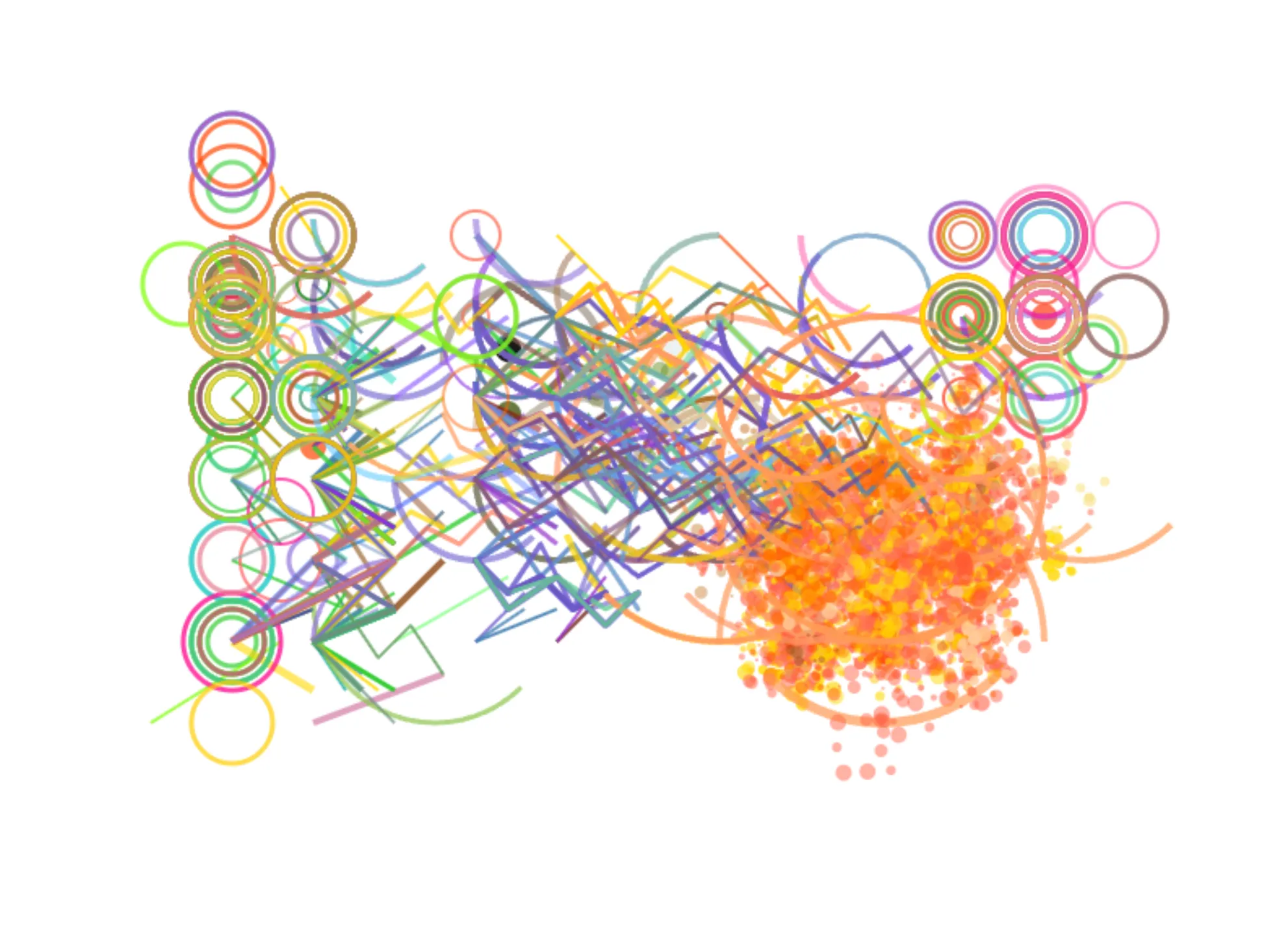
Mistral-Large is a capable model, when given good instructions, but when misdirected will just produce random noise. I do like this piece. But it’s not a great representation of an Impressionist Patchwork Elephant.
Finally, the painting VLM can declare a layer as “complete”. Once all layers are described as “complete”, the painting is considered “complete” too. At first, the models were very eager to mark their work as complete, with some paintings receiving one or two strokes only. To remedy this, I implemented a minimum number of strokes. The language model is told that it’s current layer has a minimum number of stroke iterations, and the iteration it’s currently on.
The Evaluator
The Evaluator used to manage the painting & layer completion. However, I found language models to be remarkably poor at marking their own homework in this regard. The code asks a different instance of the VLM to assess the piece’s stylistic similarity to the artist or genre of art. The range requested from the VLM is “A score of 0-20 means no resemblance, 21-40 means slight resemblance, 41-60 means moderate resemblance, 61-80 means strong resemblance, and 81-100 means exceptional resemblance”. If the model acheived more than 80, the painting process would end.
Though this felt like an interesting way to determine quality, it mostly brought about one of two outcomes: 1) the painting was declared exceptional within a few dozen strokes, exiting very early with incomplete pieces, or 2) the painting was consistently declared moderate, meaning never-ending paintings which tended to get worse over time.
I removed the score-based completion, and refactored that into the painter, so that the implementing language model could decide when a painting was “complete”. I decided to keep the evaluator implemented though, because it’s still interesting to Claude and Mistral’s models savagely criticise what is in effect their own output.